Full Stack Dev Notes - ExaCare, W24

Founded in early 2022, ExaCare is a health tech startup building an all-in-one EHR and CRM platform for senior care homes. They raised $6.5M from Foundation Capital, 1984 Ventures, and Fractal Software. Below are the technical notes I took as the first SWE Intern hire from Jan - Apr 2024.
In Oct 2025, they raised a $30M Series A led by Insight Partners.
Backend - How to Make an API Endpoint
Tech stack: serverless architecture, AWS Lambda, API Gateway, S3, Node.js, Sequelize, OpenAPI, PostgresSQL, pgAdmin, Docker
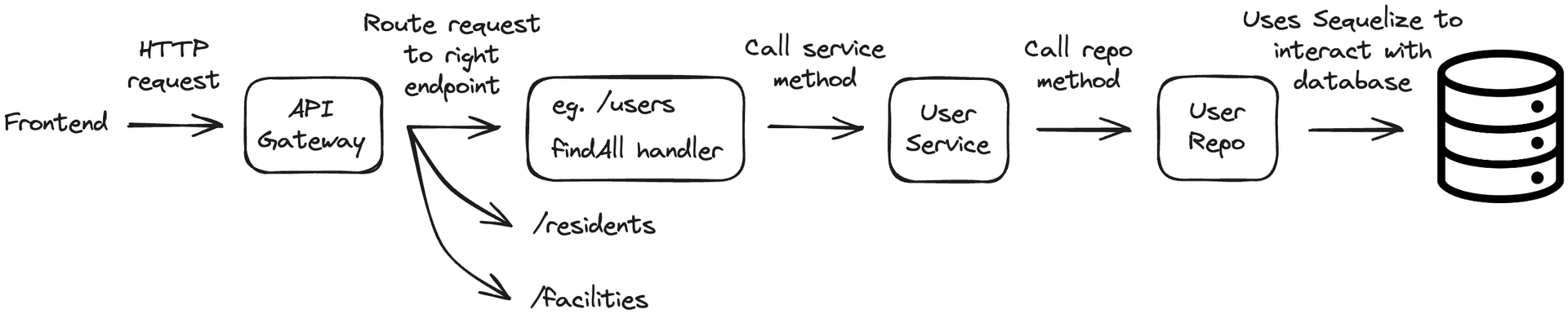
General flow:
- 1. Define API endpoint
- - In .yml file
- - In .yaml file (for OpenAPI schema)
- 2. Create handler code (eg. findAll)
- 3. Define data models
- - In /models folder (defines structure + relationships)
- - In migration file (creates the database table + columns)
- 4. Create service class (calls repo class methods)
- 5. Create repo class (methods interact with database)
The BE uses serverless cloud architecture through API Gateway and AWS Lambda. API Gateway is like a centralized control center that receives a request from the FE and directs it to the right service or Lambda function. Lambda is a compute service that executes your code in response to events like HTTP requests (hence eliminating the need to manage servers).
Here’s the request-response flow:
- 1. API Gateway receives HTTP request from FE client
- 2. API Gateway routes request to appropriate endpoint (eg. /users)
- 3. Lambda function is triggered, executing code associated with the endpoint
- 4. Lambda function processes and sends response back to API Gateway
- 5. API Gateway receives response and sends it back to FE client
What it looks like in code:
Defining API Endpoints
In the BE’s root directory, there’s various serverless.{SERVICE_NAME}.yml files. These represent the different microservices responsible for handling APIs specific to different parts of the app. Instead of running npm run start and waiting ~8 minutes for all services, we can run only the services we need, reducing the wait time for services to boot up.
Inside a serverless.{SERVICE_NAME}.yml file, the ‘functions’ are the most important part:
- - handler: path to where the handler’s code is
- - path: URL of endpoint; uses { } for path parameters
- - method: type of HTTP request
- - request → parameters → paths: defines name of path parameter above
Next, before going into the handler code (eg. findAll.ts), the endpoints also need to be defined in the yaml files under the api-schemas folder. Once a script is run, OpenAPI will generate the necessary types for the requests/responses, which the FE can then also use by running a script. This makes it easier for the FE/BE developers to be in sync and work with the same object types.
Overview of a .yaml file:
- - paths: the endpoint URL
- - get/put/post: type of HTTP method
- - description: what the endpoint does
- - operationId: important for the handler code later on
- - parameters: describe the path and query parameters
- - responses: 400, 200, etc.
- - 200 response: need to specify content type, as well as response type (eg. response is of type User, defined in components section at bottom of same file)
Lambda Handler
In the actual lambda handler code (eg. findAll.ts), a service (eg. UserService) is instantiated and one of its methods will be called (eg. userService.findAll()). If the request has a response, it’ll be sent to API Gateway and then back to the FE. This Lambda handler file is also where validations are done to ensure the FE sent adequate/correct data.
Defining Data Models
Before creating the service and repo classes, the object types need to be defined through a model and migration file. This is done with Sequelize, an Object-Relational Mapping library that lets you define an OOP model representing a database table.
Both the service and repo class will make use of object types defined in the /models folder. These files essentially define the structure of the data models, like the properties they include and any relationships they have with other types.
Similarly, a migration file is needed to actually create the database table and define its columns. These files only run once, so for adding a new column, you’d have to create a new file.
Service Class
The service class serves as an intermediary between the handler code that receives the HTTP request and the repository code that actually interacts with the database through Sequelize. Its methods will vary depending on the HTTP request and the action/response expected.
Repo Class
The repo class contains the repo methods that the service methods use. This code is where you specify what properties you want from the database rows (eg. where X property is false, where Y property equals Z).
Frontend
Tech stack: TypeScript, React, MUI, React Hook Form, TanStack, OpenAPI
I built frontend components across Assessments (forms), Billing, and the Data Center page. I used MUI for table (data grid) features like filters, search bars, and sorting methods. React Hook Form was used for all the form inputs, while TanStack and OpenAPI were used for API requests/responses.